
One of the most confusing topics for developers learning Git is the difference between Merge and Rebase.
At first, they seem exactly the same: combine changes from one branch into another.
But they achieve that goal in very different ways.
Let's understand it with a simple story.
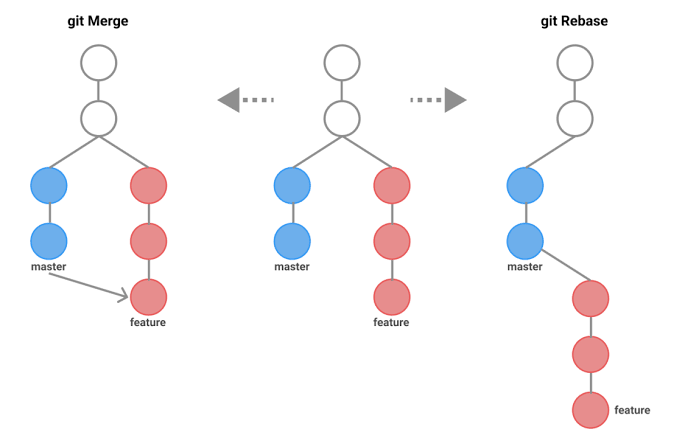
Imagine this scenario
You and your teammate start from the same commit.
main
  A ── B
        \
feature   C ── D
While you are working on your feature, someone else adds new commits to main.
main
A ── B ── E ── F

feature
      C ── D
Now your feature branch is behind main. You have two options.
Option 1: Git Merge
When you merge main into your feature branch, Git keeps both histories exactly as they happened.
git merge main
Result:
A ── B ── E ── F
      \         \
       C ── D ── M
M is a merge commit. It simply says: these two development histories have now been combined.
Advantages
- Never rewrites history
- Safest for shared branches
- Shows exactly when branches were merged
- Easy to understand what happened
Disadvantages
- Extra merge commits
- History becomes more cluttered
- Large projects may end up with many merge commits
Option 2: Git Rebase
Instead of creating a merge commit, Git moves your work on top of the latest main.
git rebase main
Result:
Before

main
A ── B ── E ── F

feature
      C ── D

After rebase

A ── B ── E ── F ── C' ── D'
Notice something important: the commits became C' and D'. They are technically new commits.
Git replayed your work as if you had started after commits E and F.
Advantages
- Clean, linear history
- Easier to read logs
- Better for code review
- Looks like one straight timeline
Disadvantages
- Rewrites commit history
- Can create problems if others are already using those commits
- Should be used carefully on shared branches
The biggest difference
| Merge | Rebase | |
|---|---|---|
| What it does | Keeps history exactly as it happened | Rewrites history to look cleaner |
| Feel | History stays real | History looks linear |
Merge preserves the timeline. Rebase rewrites it for readability.
When should you use merge?
Use merge when:
- Working on shared branches
- Merging feature branches into
main - You want to preserve the real development timeline
- Team collaboration is the priority
When should you use rebase?
Use rebase when:
- Updating your local feature branch before opening a PR
- Cleaning up commit history
- Working on your own branch
- You want a linear Git history
A simple rule I follow
Before opening a Pull Request:
git fetch origin
git rebase origin/main
This lets me resolve conflicts early and keeps my branch up to date.
When the Pull Request is approved: merge the PR (via GitHub/GitLab UI or git merge). That keeps collaboration safe while maintaining a clean history on the feature branch.
The golden rule
Quick comparison
| Merge | Rebase |
|---|---|
| Preserves history | Rewrites history |
| Creates a merge commit | No merge commit |
| Safe for shared branches | Best for local branches |
| Real project timeline | Clean linear timeline |
| Easier collaboration | Cleaner commit history |
The bottom line
Understanding when to use merge and when to use rebase matters more than memorizing the commands.
Once this clicks, Git becomes far less intimidating—and your team's workflow becomes much smoother.
If you also want rescue recipes for when things go wrong, see Oh Shit, Git?!. For building intuition from scratch, try Build Your Own Git From Scratch.